What is Black Hole?
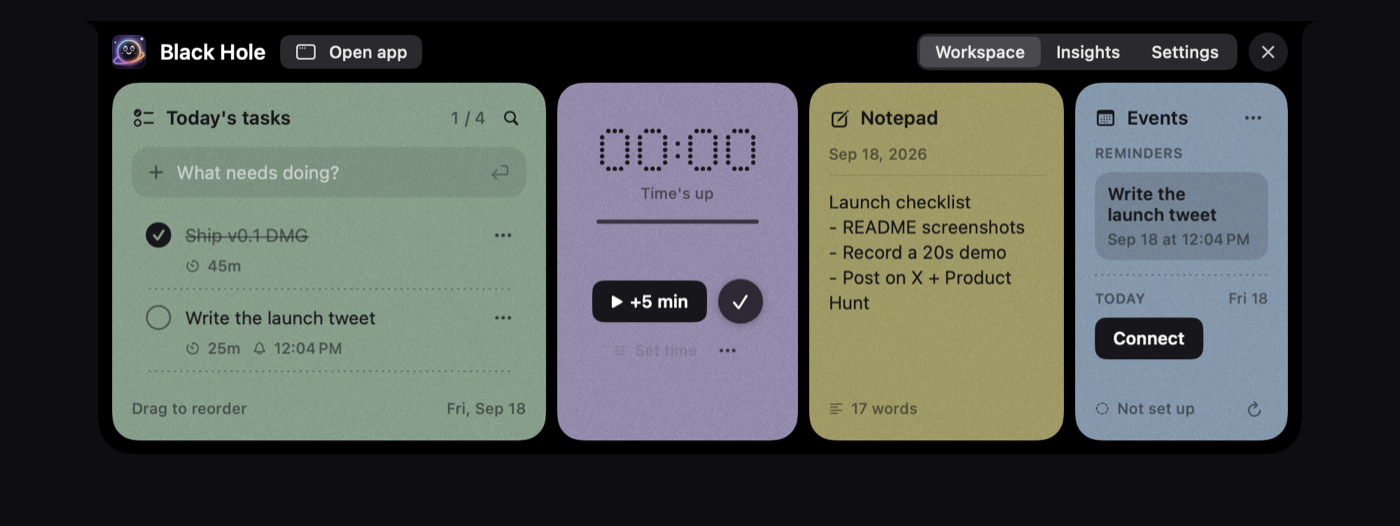
Black Hole is a free, open-source Mac app that turns the notch at the top of your screen into a small, always-there workspace for your day. Hover the notch — or press Option-N — and a panel drops out with today's tasks, a focus timer, a daily notepad and today's calendar. It's built for macOS 14 or later on Apple silicon, and it asks for no account and does no tracking.
Who it's for
- Notch-equipped MacBook owners who want their day one gesture away instead of buried in separate apps.
- Focus-driven workers who like a visible countdown and a live progress indicator while they work.
- AI-assisted tinkerers who want Claude, ChatGPT or Cursor to read and manage their tasks, focus sessions and notes.
Key features
Tasks that roll over
Add, check off and drag to reorder tasks, with time limits, reminders and a move-to-tomorrow option. Anything unfinished rolls over on its own, so nothing quietly disappears at midnight.
Focus timer as a live island
The timer works as a countdown or a stopwatch, and while it runs the notch becomes a live island showing progress on one side and time left on the other. It pauses when your Mac sleeps.
Daily notepad
The notepad saves as you type. Put the cursor on a line, press ⌘↩, and that line becomes a task for today.
Calendar and meeting countdown
iCloud, Google (as many accounts as you like) and Outlook calendars appear colour-coded and read-only. Five minutes before a meeting, the notch counts down to it — click to join the call.
What stands out
Your whole working day, living in the notch — no account, no tracking, nothing leaving your Mac.
That combination of a tiny, glanceable surface and genuinely local storage is the real edge here. Tasks, notes and focus data stay on your machine, and the optional AI access is protected by a secret token rather than an account. There's also a small character in the notch who blinks, looks up when you hover, cheers when you finish something and dozes off when you've been away.
Worth checking out if…
You want a lightweight daily cockpit that doesn't demand a subscription or a login, and you like the idea of your Mac's notch finally doing something useful. It's also worth a look if you already lean on an AI assistant for planning and want it to work directly with your day. Just note that builds aren't notarized by Apple yet, so on first launch you'll need to open System Settings → Privacy & Security → Open Anyway.