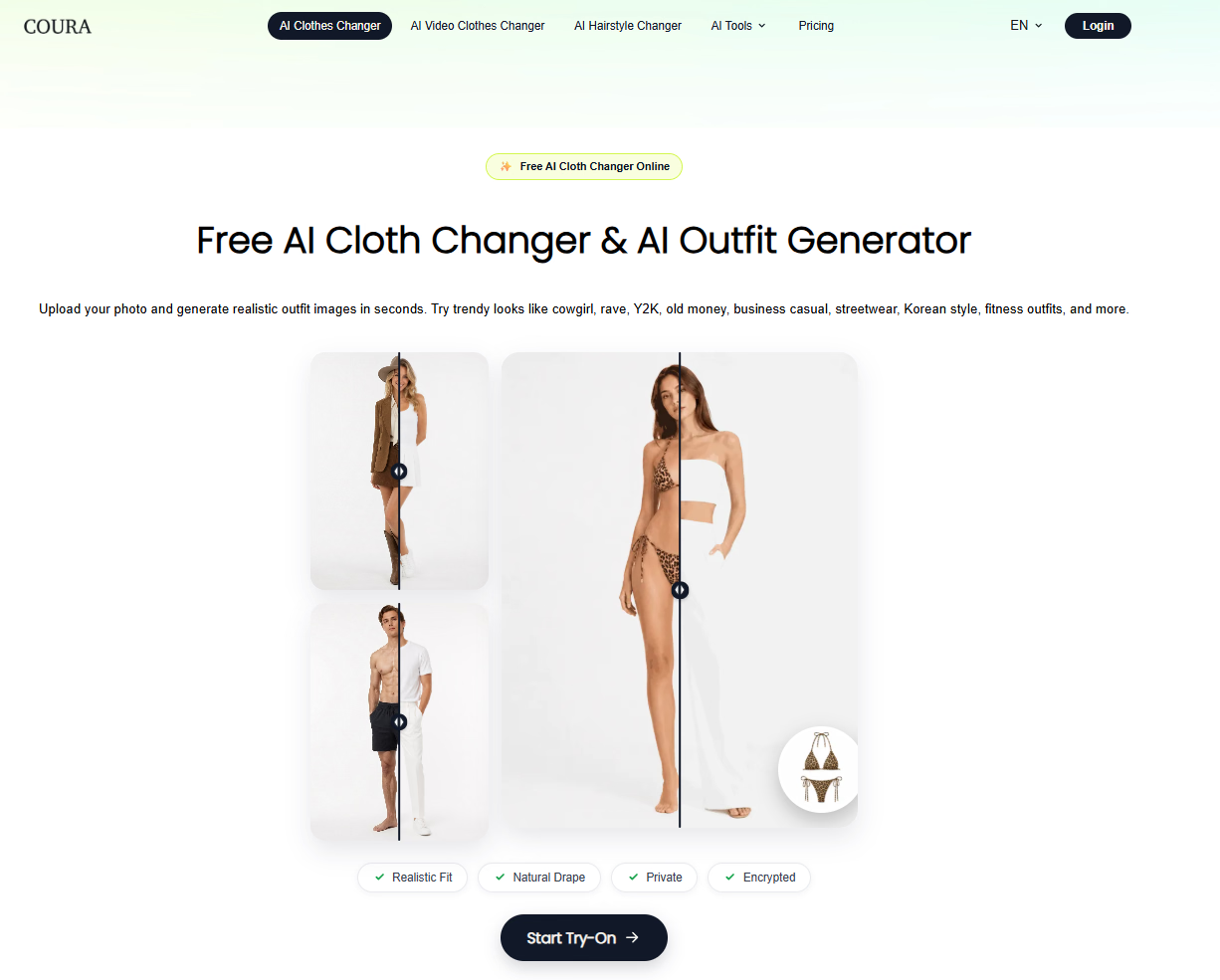
AI cloth changer for realistic outfit photos
This project is scheduled for launch
Launch date: Monday, November 23, 2026, 08:00 UTC

Coura is a free AI cloth changer that transforms your photos into realistic outfit images in seconds. Upload a portrait or full-body shot, then pick a garment or a trending style like cowgirl, rave, Y2K, old money, streetwear, or Korean fashion.
Build your personal AI fitting room and preview any look before you wear it.
The AI adapts clothing to your body shape, pose, and photo style, producing natural drape and realistic fit for social media, shopping previews, and professional headshots. Privacy is handled with encrypted uploads.
| Feature | Free | Premium |
|---|---|---|
| Outfit generation | Yes | Yes |
| Style library | Basic | Extended |
| HD downloads | No | Yes |
Comments will be available once the project is launched.
Maker
李国林
Coura AI is a free AI cloth changer and outfit generator that turns an ordinary photo into a realistic outfit image in seconds. You upload a clear portrait or full-body shot, then either upload a garment image or pick a trending style — cowgirl, rave, Y2K, 90s, old money, business casual, streetwear, Korean style, fitness, and more. Coura adapts the clothing to your body shape, pose, and photo style, so the result shows natural drape and a believable fit rather than a pasted-on look. It works entirely online, with no complicated editing skills required, and uploads are handled with encrypted privacy.
Generate new outfit images directly in the browser at no cost. Upload a photo, change the clothes, and preview different looks in seconds.
Coura adapts garments to your body shape, pose, and photo style. The result is a natural-looking outfit image suited to social media, profile photos, shopping previews, and creative projects.
Choose from poolside, cowgirl, rave, Y2K, 90s, old money, business casual, everyday casual, formal suit, streetwear, Korean style, and fitness outfits. Each style is built around recognizable fashion cues, from western boots and denim to elegant blazers and quiet luxury tones.
Upload your own clothes and preview different combinations on your photo. Mix tops, bottoms, dresses, suits, and accessories to find the look that fits you best.
Build your personal AI fitting room and preview any look before you wear it.
That framing is what separates Coura from a simple filter: it's positioned as a try-before-you-wear tool rather than a one-off novelty. The style range covers both everyday casual wear and special occasions, so the same photo can be reused across very different contexts. Free generation keeps the barrier low, while HD downloads sit in the premium tier for anyone who needs higher-resolution output.
You want to see yourself in a trending outfit before buying or wearing it, or you need quick, realistic outfit imagery for social media, shopping previews, or professional headshots. If you'd rather experiment with your own garments than browse a fixed catalog, the personal fitting room approach is the part worth trying first.
Other tools you might consider
Am I Pretty is an AI-powered beauty analysis platform that provides instant, personalized feedback on facial and body attractiveness. Users can upload a selfie and choose between Scientific Evaluation for constructive insights or Roast Mode for playful, shareable fun. Discover the beauty that makes you, you. Your face. Your rules. Your results. The tool analyzes eight key dimensions including symmetry, harmony, proportions, and skin quality, delivering results in seconds with practical improvement tips. All photos are processed privately and not stored. Mode Focus Scientific Evaluation Gentle, constructive feedback Roast Mode Playful, shareable fun
Image Upscaler 4K is a dual-engine AI image upscaling platform. Get fast 4x enlargement in 3 seconds with Recraft Crisp, or use five specialized Topaz AI models for professional-grade results. Try it at imageupscaler4k.com
MS Paint AI Generator is a fun image restyling tool for creators, designers, and content teams. It transforms uploaded images or text prompts into classic MS Paint-style low-fidelity doodle effects. It's perfect for creating memes, retro visuals, social media assets, and lighthearted brand content, turning polished images into creative pictures with a mouse-drawn feel. About MS Paint AI Generator What is MS Paint AI Generator? MS Paint AI Generator is an AI image stylization tool specifically designed to simulate the rough, cute, and slightly clumsy hand-drawn texture of early paint software. Users can upload photos, product images, portraits, or any visual material, and the AI redraws them to look like they were created with a mouse in a paint program. It doesn't aim for photorealism; instead, it turns "imperfection" into a recognizable visual style. Who It's For Social media creators : Need to quickly produce funny, contrasting, and shareable images. Brand operators : Want to add a lighthearted, retro visual style to campaigns, posters, or content. Designers and illustrators : Looking to quickly test low-fidelity, hand-drawn, pixelated, or early computer graphics styles. Meme creators : Need to turn ordinary photos into more exaggerated, funnier memes or community assets. Content teams : Want to generate more memorable visual variations for articles, video thumbnails, or marketing materials. Core Features Image to MS Paint Style Upload a photo or illustration, and the AI preserves the main subject outline and composition while redrawing details with thick lines, low precision, and a mouse-drawn paint software effect. It's great for creating contrast, making serious images feel light and fun. Prompt-Driven Doodle Generation Besides uploading images, you can also generate MS Paint-style images from text descriptions. Input a character, scene, action, or mood, and the AI transforms it into a simple, intuitive visual result with an early computer graphics feel. Perfect for Memes and Social Content The MS Paint style naturally carries a sense of humor and nostalgia. Whether you're making memes, community graphics, short video thumbnails, or adding a bit of "playful" visual interest to social posts, you can quickly produce usable assets. Low-Fidelity Visual Experimentation For designers and creative teams, this tool helps quickly test rough lines, simple color blocks, and low-fidelity visual language. It lets you get direction sketches close to hand-drawn doodles without manual drawing. Key Highlight "Redraw any image to look like it was drawn with a mouse in MS Paint." This sentence captures the core appeal of MS Paint AI Generator: it deliberately avoids polish, turning roughness, clumsiness, and retro vibes into creative expression. While many AI image tools strive for more realism and higher resolution, this tool helps users generate images that are funnier, lighter, and more memorable. Worth a Try If You... Want to quickly turn ordinary photos, product images, or character art into a retro paint software style; or you need a lighthearted visual effect for memes, social media, brand campaigns, or creative testing. MS Paint AI Generator is for creators who don't want perfection but want their images to have more personality and be more noticeable.
Use this shoes poster generator to turn campaign seeds into AI footwear poster concepts, shoe shop layouts, and reusable background directions. It helps creators explore product ads, campaign visuals, and polished poster ideas quickly.