Voting open ยท ends inโ
Fix overexposed photos with AI

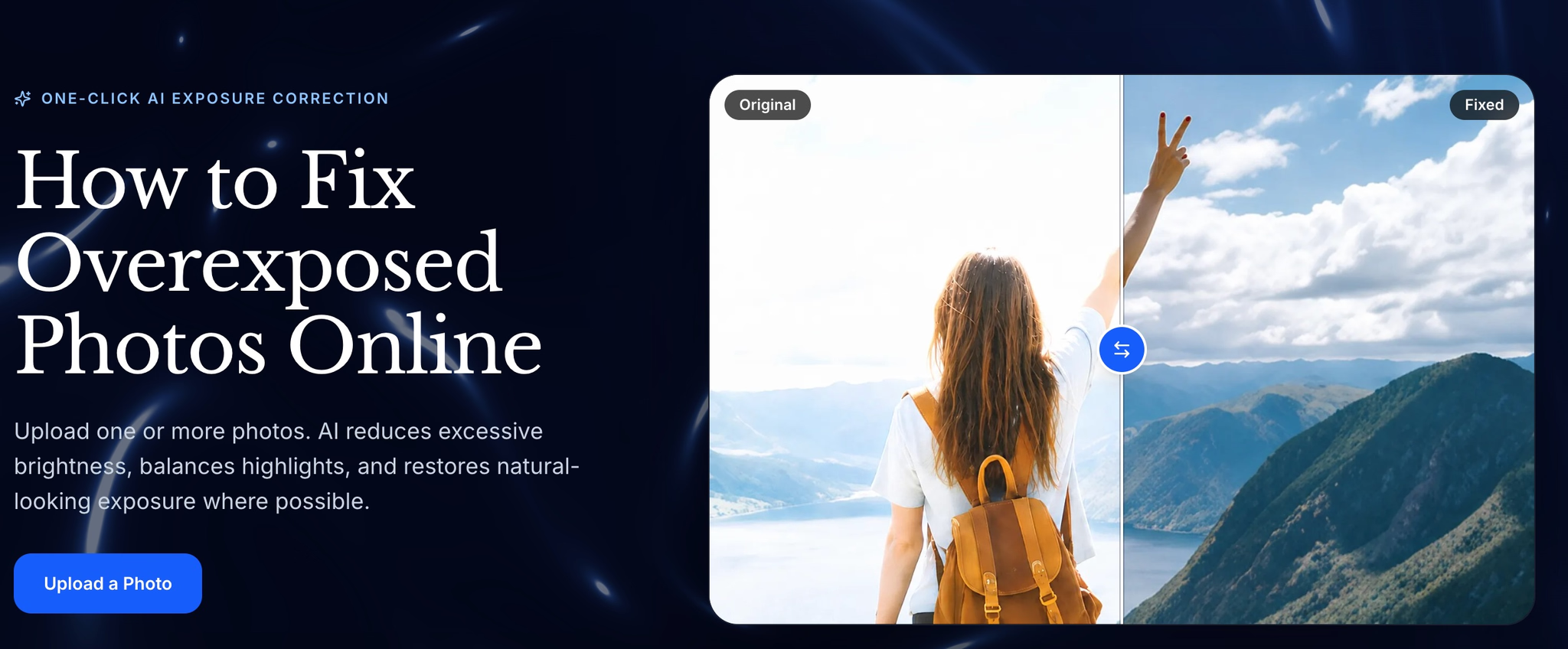
Correct overexposed photos online by reducing excessive brightness and balancing highlights, midtones, and overall exposure. Supports multi-image uploads in JPG, PNG, and WebP, with before-and-after comparison and result downloads. Ideal for backlit portraits, overly strong flash, and bright landscapes; however, completely lost highlight detail cannot be guaranteed to be recovered.
Product Keywords
Loading comments...
Maker
Fix Overexposed Photos is an AI-powered online tool for correcting images that came out too bright. It reduces blown-out highlights, rebalances midtones, and evens out overall exposure so washed-out photos look natural again. You upload one or several images, let the AI process each one, then compare the original against the corrected version before downloading. It works with JPG, JPEG, PNG, and WebP files, and the workflow is designed to be simple enough that you don't need to touch curves, masks, or individual color channels by hand.
Each uploaded photo is processed as an independent task, with the model reducing excessive brightness and balancing highlights and midtones. It also aims to preserve natural skin and scene colors rather than producing a flat, artificial look.
A draggable handle lets you inspect the original and corrected versions side by side. This makes it easy to judge whether the correction actually improved the image before you commit to downloading it.
You can drop in one photo or several at once, in JPG, JPEG, PNG, or WebP format. High-resolution originals generally give the AI more detail to work with.
Corrected results can be downloaded without a watermark, and photo processing is kept private. Credits are consumed per fix, with 30 starter credits available and no payment required to begin.
It fixes the exposure automatically, but it's honest about what no editor can bring back.
That honesty is the real differentiator. The tool is clear that bright areas still holding faint texture or color are usually recoverable, while pure white pixels with no recorded detail simply cannot be reconstructed. Instead of overpromising, it focuses on reducing glare, improving surrounding tones, and making the photo look more balanced โ which sets realistic expectations and builds trust.
You regularly end up with backlit portraits, overly strong flash, or bright landscapes that look washed out, and you want a fast, no-fuss correction without manual editing. It's also a good fit if you'd rather compare results visually before downloading than trust a blind one-click fix. Just keep in mind that if highlight detail was never captured in the file, no tool can fully restore it.

Other tools you might consider
Image Upscaler 4K is a dual-engine AI image upscaling platform. Get fast 4x enlargement in 3 seconds with Recraft Crisp, or use five specialized Topaz AI models for professional-grade results. Try it at imageupscaler4k.com
Photo to Video AI Free is an online AI tool that turns a single photo into a dynamic video. Upload an image, describe the motion you want, and generate an AI video directly in your browser. It is designed for portraits, couple photos, travel pictures, product images, pets, and social media content. Users can control the animation with text prompts and choose different video formats and durations. New users can try the photo-to-video workflow for free, making it easy to test AI-generated motion before purchasing additional credits. No software installation is required.
MS Paint AI Generator is a fun image restyling tool for creators, designers, and content teams. It transforms uploaded images or text prompts into classic MS Paint-style low-fidelity doodle effects. It's perfect for creating memes, retro visuals, social media assets, and lighthearted brand content, turning polished images into creative pictures with a mouse-drawn feel. About MS Paint AI Generator What is MS Paint AI Generator? MS Paint AI Generator is an AI image stylization tool specifically designed to simulate the rough, cute, and slightly clumsy hand-drawn texture of early paint software. Users can upload photos, product images, portraits, or any visual material, and the AI redraws them to look like they were created with a mouse in a paint program. It doesn't aim for photorealism; instead, it turns "imperfection" into a recognizable visual style. Who It's For Social media creators : Need to quickly produce funny, contrasting, and shareable images. Brand operators : Want to add a lighthearted, retro visual style to campaigns, posters, or content. Designers and illustrators : Looking to quickly test low-fidelity, hand-drawn, pixelated, or early computer graphics styles. Meme creators : Need to turn ordinary photos into more exaggerated, funnier memes or community assets. Content teams : Want to generate more memorable visual variations for articles, video thumbnails, or marketing materials. Core Features Image to MS Paint Style Upload a photo or illustration, and the AI preserves the main subject outline and composition while redrawing details with thick lines, low precision, and a mouse-drawn paint software effect. It's great for creating contrast, making serious images feel light and fun. Prompt-Driven Doodle Generation Besides uploading images, you can also generate MS Paint-style images from text descriptions. Input a character, scene, action, or mood, and the AI transforms it into a simple, intuitive visual result with an early computer graphics feel. Perfect for Memes and Social Content The MS Paint style naturally carries a sense of humor and nostalgia. Whether you're making memes, community graphics, short video thumbnails, or adding a bit of "playful" visual interest to social posts, you can quickly produce usable assets. Low-Fidelity Visual Experimentation For designers and creative teams, this tool helps quickly test rough lines, simple color blocks, and low-fidelity visual language. It lets you get direction sketches close to hand-drawn doodles without manual drawing. Key Highlight "Redraw any image to look like it was drawn with a mouse in MS Paint." This sentence captures the core appeal of MS Paint AI Generator: it deliberately avoids polish, turning roughness, clumsiness, and retro vibes into creative expression. While many AI image tools strive for more realism and higher resolution, this tool helps users generate images that are funnier, lighter, and more memorable. Worth a Try If You... Want to quickly turn ordinary photos, product images, or character art into a retro paint software style; or you need a lighthearted visual effect for memes, social media, brand campaigns, or creative testing. MS Paint AI Generator is for creators who don't want perfection but want their images to have more personality and be more noticeable.
Am I Pretty is an AI-powered beauty analysis platform that provides instant, personalized feedback on facial and body attractiveness. Users can upload a selfie and choose between Scientific Evaluation for constructive insights or Roast Mode for playful, shareable fun. Discover the beauty that makes you, you. Your face. Your rules. Your results. The tool analyzes eight key dimensions including symmetry, harmony, proportions, and skin quality, delivering results in seconds with practical improvement tips. All photos are processed privately and not stored. Mode Focus Scientific Evaluation Gentle, constructive feedback Roast Mode Playful, shareable fun
Loading comments...