Voting open ยท ends inโ
Free browser-based normal map generator with live controls

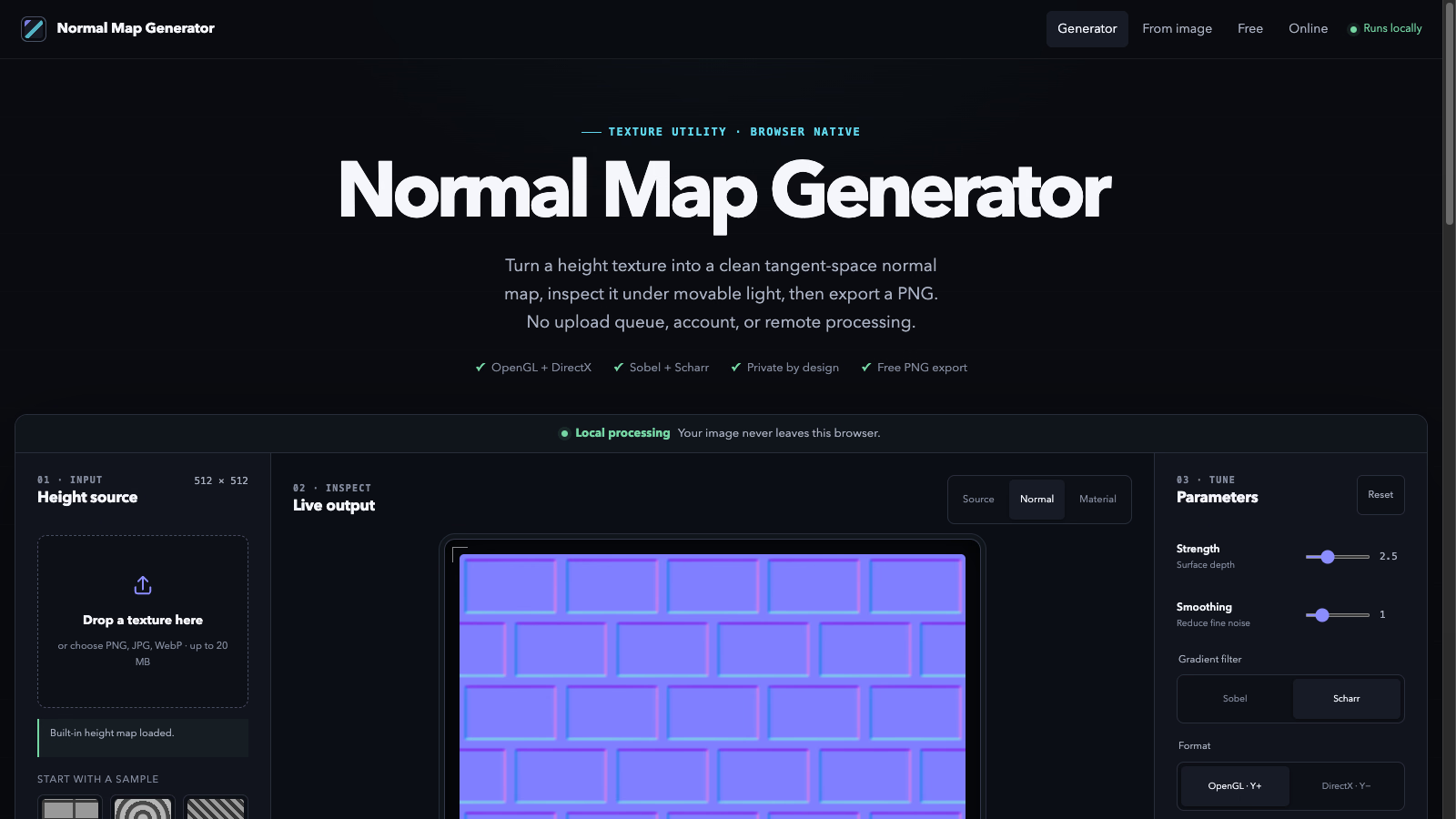
Normal Map Bench creates tangent-space normal maps from images directly in your browser. Tune strength, smoothing and edge dilation with live controls, preview under a movable light, switch between OpenGL and DirectX Y conventions, and export PNG at the original resolution. Free, no upload, no account โ processing stays local.
Product Keywords
Loading comments...
Maker
Normal Map Bench is a browser-based tool that turns ordinary images into tangent-space normal maps. Instead of storing visible color, a normal map stores a direction in every pixel, letting a material react to light as though fine ridges, dents, seams, and pores were modelled into the surface. Normal Map Bench derives those directions from image brightness and keeps the entire conversion on your own device.
You can start from a grayscale height map for the most predictable result, or feed in a photo or painted texture whose brightness already suggests surface relief. From there, live controls let you shape the result and inspect it under a movable light before exporting a PNG at the original resolution.
Bright areas are read as higher and dark areas as lower, producing a tangent-space normal map from your source image. A dedicated grayscale height map gives the most predictable outcome, though photos and painted textures can work when their brightness describes relief.
Sobel is familiar, efficient, and often suitable for graphic textures. Scharr weights each pixel's surroundings more evenly, which can produce steadier diagonal detail. Neither option invents geometry โ both measure changes in the source height field.
The two formats mainly disagree about the green channel: OpenGL uses Y+, while many DirectX pipelines expect Yโ. If grooves look raised or lighting moves the wrong way vertically, you switch the format rather than rebuild the texture, and the preview and downloaded PNG update together.
Clamp repeats the border pixel and suits isolated assets, while Wrap samples the opposite edge for tileable surfaces. A 2ร or 4ร tiled preview helps you spot border discontinuities before export, and the tile control affects inspection only.
Processing stays local โ no upload, no account, no server round-trip.
That single constraint shapes how the tool feels to use. Image decoding, filtering, preview rendering, and PNG creation all happen in the browser, so there is no upload endpoint, analytics script, or third-party image processor involved. You can tune strength, smoothing, filter, orientation, height inversion, and edge behavior with live feedback, then download the full generated map.
You want a fast, private way to generate normal maps without installing software or handing your textures to a remote service. It's especially handy if you need to compare OpenGL and DirectX output, test tileable edges, or simply preview how a height image will catch light before committing it to a material.

Other tools you might consider
MS Paint AI Generator is a fun image restyling tool for creators, designers, and content teams. It transforms uploaded images or text prompts into classic MS Paint-style low-fidelity doodle effects. It's perfect for creating memes, retro visuals, social media assets, and lighthearted brand content, turning polished images into creative pictures with a mouse-drawn feel. About MS Paint AI Generator What is MS Paint AI Generator? MS Paint AI Generator is an AI image stylization tool specifically designed to simulate the rough, cute, and slightly clumsy hand-drawn texture of early paint software. Users can upload photos, product images, portraits, or any visual material, and the AI redraws them to look like they were created with a mouse in a paint program. It doesn't aim for photorealism; instead, it turns "imperfection" into a recognizable visual style. Who It's For Social media creators : Need to quickly produce funny, contrasting, and shareable images. Brand operators : Want to add a lighthearted, retro visual style to campaigns, posters, or content. Designers and illustrators : Looking to quickly test low-fidelity, hand-drawn, pixelated, or early computer graphics styles. Meme creators : Need to turn ordinary photos into more exaggerated, funnier memes or community assets. Content teams : Want to generate more memorable visual variations for articles, video thumbnails, or marketing materials. Core Features Image to MS Paint Style Upload a photo or illustration, and the AI preserves the main subject outline and composition while redrawing details with thick lines, low precision, and a mouse-drawn paint software effect. It's great for creating contrast, making serious images feel light and fun. Prompt-Driven Doodle Generation Besides uploading images, you can also generate MS Paint-style images from text descriptions. Input a character, scene, action, or mood, and the AI transforms it into a simple, intuitive visual result with an early computer graphics feel. Perfect for Memes and Social Content The MS Paint style naturally carries a sense of humor and nostalgia. Whether you're making memes, community graphics, short video thumbnails, or adding a bit of "playful" visual interest to social posts, you can quickly produce usable assets. Low-Fidelity Visual Experimentation For designers and creative teams, this tool helps quickly test rough lines, simple color blocks, and low-fidelity visual language. It lets you get direction sketches close to hand-drawn doodles without manual drawing. Key Highlight "Redraw any image to look like it was drawn with a mouse in MS Paint." This sentence captures the core appeal of MS Paint AI Generator: it deliberately avoids polish, turning roughness, clumsiness, and retro vibes into creative expression. While many AI image tools strive for more realism and higher resolution, this tool helps users generate images that are funnier, lighter, and more memorable. Worth a Try If You... Want to quickly turn ordinary photos, product images, or character art into a retro paint software style; or you need a lighthearted visual effect for memes, social media, brand campaigns, or creative testing. MS Paint AI Generator is for creators who don't want perfection but want their images to have more personality and be more noticeable.
Seedream 4.0 advanced AI image generator by ByteDance. Create stunning visuals with ultra-fast 2K generation, multi-image fusion, and professional editing tools. Try free!
Professional AI image generator for creating, editing and transforming images. Generate art, photos, designs with advanced AI technology. Easy-to-use interface.
MiniMax H3 is an open multimodal model that generates 2K video with native stereo sound. It unifies text, image, and audio inputs, excelling at accurate text rendering, visual packaging, and complex instruction following for commercial content creation.
Loading comments...