
- Upvotes
- 182
- Daily rank
- #1
- Launch Date
- Sep 30, 2026
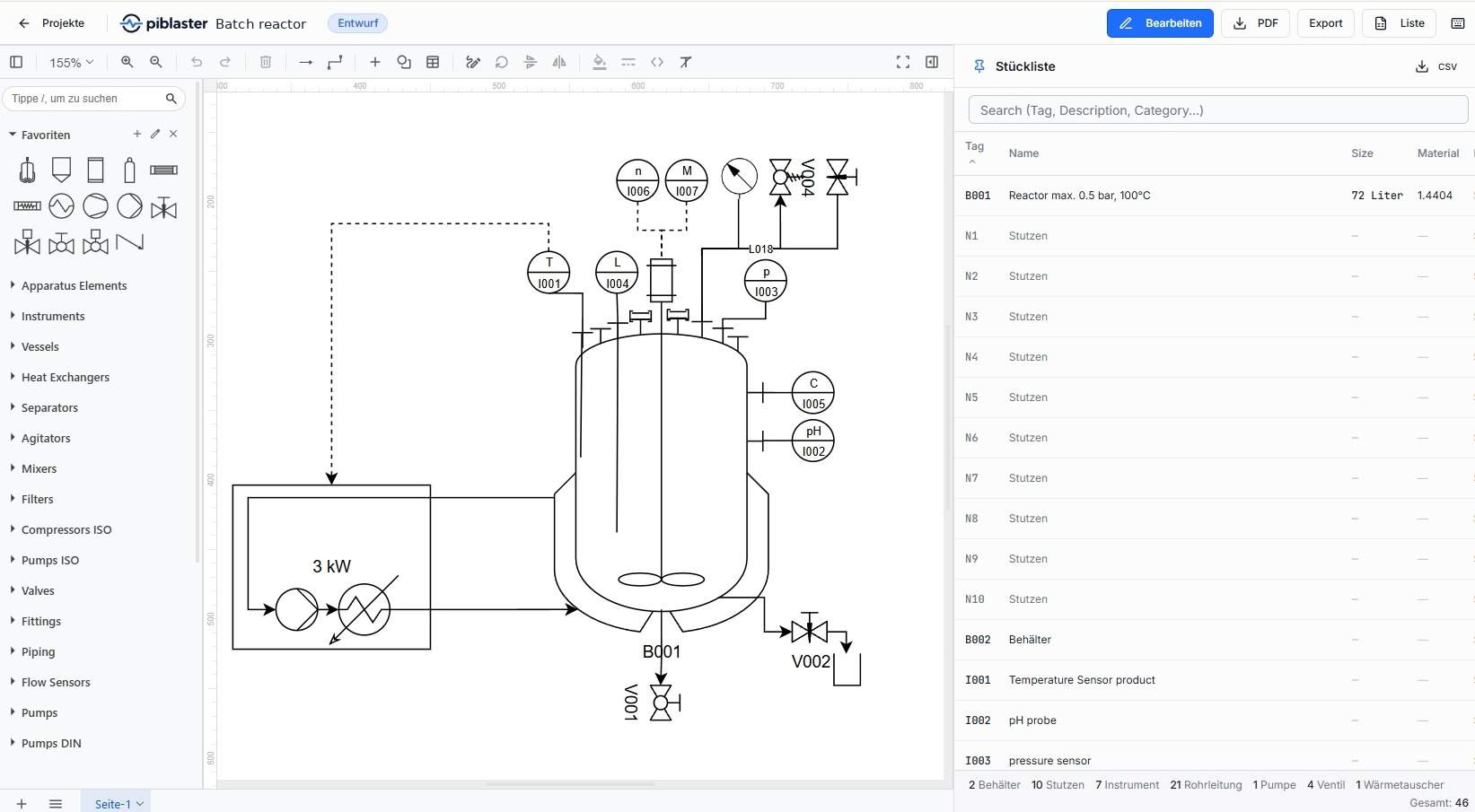
Browser-based P&ID software for piping and instrumentation diagrams per ISA-5.1 and ISO 10628 — symbol library, auto bill of materials, no install.
Browser-based P&ID software for piping and instrumentation diagrams per ISA-5.1 and ISO 10628 — symbol library, auto bill of materials, no install.
Loading comments...

Maker
piblaster is a browser-based P&ID (Piping and Instrumentation Diagram) software built for process engineers and plant builders. It lets you create piping and instrumentation diagrams directly in your web browser, following the DIN EN ISO 10628 standard. The core idea is simple: place symbols, connect them, and the complete bill of materials generates itself in real time. No installation, no license tied to a single machine — just open a browser and start drawing.
Every symbol you place on the drawing appears instantly in the bill of materials with a unique tag, category, and material fields. Changes to the diagram update the list in real time — no manual re-counting, no export-and-reformat dance. Multi-page projects are summarized automatically, and nozzles are grouped per apparatus.
The built-in symbol library covers vessels, pumps, heat exchangers, valves, and instruments. Symbols are placed with a single click and numbered automatically. Favorites and search make frequently used components easy to find, and tag bubbles for instruments are generated automatically.
Versions, approvals, and project history are integrated directly into the tool. Multiple teams can work with clear roles, and project locks prevent conflicting edits during multi-user access. No external PDM system is required.
piblaster runs entirely in the browser on Windows, macOS, iPad, Android tablets, and Linux. A current Chromium, Safari, or Firefox browser is all you need — no drivers, no admin rights, no IT approval. Touch controls work on tablets, keyboard shortcuts on desktop, and automatic updates mean everyone on the team uses the same version.
The bill of materials writes itself while you draw — that's the whole point.
Most P&ID tools treat the BOM as an afterthought, something you export and clean up later. piblaster flips that: the Stückliste is the live backbone of the drawing process. Every symbol, tag, size, and material is captured the moment you place it, and the list updates as you edit. Data is stored in Germany, DSGVO-compliant, and PDF/CSV export is one click away — no convoluted print dialogs or spreadsheet gymnastics.
You're tired of P&ID software that's either too complicated, too expensive to roll out to the whole team, or lacking a genuinely useful bill of materials function. If you work with stainless steel 1.4404/1.4571 as standard material, Tri-Clamp and DIN flanges, and need multi-page drawing frames with Excel and PDF export, piblaster is built for exactly that workflow. It's also a strong fit if you want to switch seamlessly between a desktop PC, MacBook, and iPad on the same project — without IT involvement or per-seat license headaches.
Loading comments...