What is ScreenOtter?
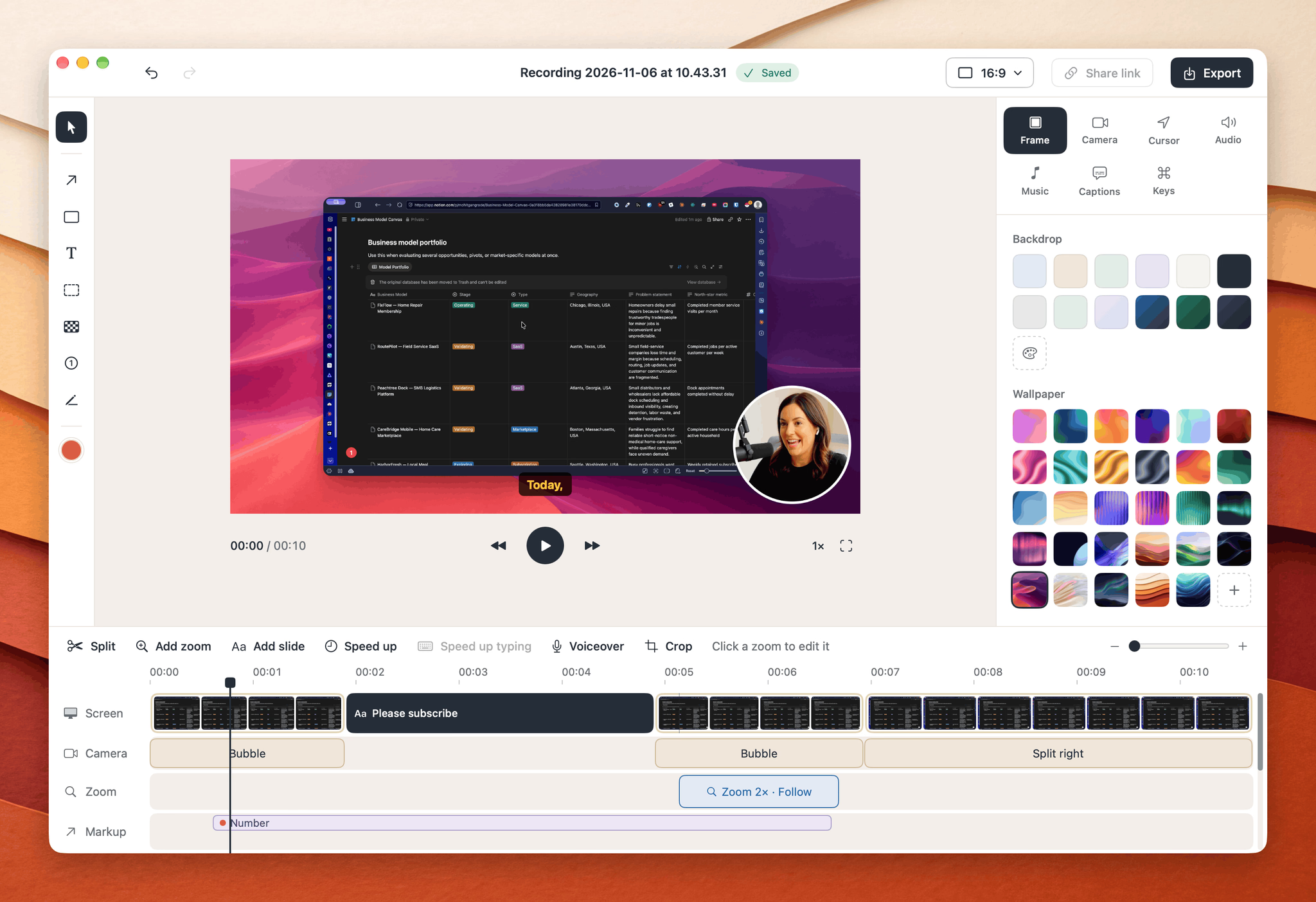
ScreenOtter is a native Mac app for screen recording and screenshots that does the editing work for you. Instead of capturing raw footage and fixing it later, it builds the polish in as you record — automatic zooms on every click, smooth pointer movement, and a camera overlay you can rearrange afterward. Record an area, a window, or a full display with your microphone, camera, and system audio, then export an MP4 up to 4K at 60 fps or a looping GIF. Everything runs locally on your Mac: nothing is uploaded, and no account is required.
Who it's for
- Founders and product teams — who need a clean demo or walkthrough without opening a video editor.
- Designers and developers — who want clicks, shortcuts, and typing shown clearly in tutorials and code walkthroughs.
- Tutorial and course creators — who record often and would rather skip manual keyframing and captioning.
Key features
Automatic zoom and cursor highlights
Every click triggers a smooth cinematic zoom, so viewers always know where to look without manual keyframes. Cursor highlights emphasize clicks and scrolls with subtle but noticeable visual cues.
Word-by-word subtitles and shortcut display
ScreenOtter turns a recording into a transcript and shows each word as it's spoken, producing timed subtitles with no manual captioning. Keyboard shortcuts are displayed on the video as you press them, which suits tutorials and coding demos.
Webcam, audio, and backgrounds
Add your built-in webcam, an external camera, or an iPhone as a facecam. Capture microphone and system audio in the same recording, then add background music, gradients, wallpapers, or canvas backgrounds in one click.
One-click recording from the menu bar
Start from the menu bar and choose a screen, window, or custom area. Work normally while ScreenOtter tracks your interactions, then stop and export — no post-production step.
What stands out
ScreenOtter handles the cinematography so you can focus on what you're actually building.
That framing is the product's real edge: the zoom, cursor treatment, and subtitle timing are applied as you record rather than assembled afterward. It's a one-time purchase with no subscription, and every feature works in the free version, with exports capped at 720p and a small badge. Paying once unlocks full quality and includes future v1.x updates.
Worth checking out if…
You record demos, tutorials, or walkthroughs regularly and want them to look intentional without learning an editor. It's also a good fit if you'd rather keep recordings on your own machine than upload them to a service. ScreenOtter requires macOS 13 Ventura or later, is optimized for Apple Silicon, and also runs on Intel Macs — with a 30-day money-back guarantee if it doesn't click for you.